
Appearance
Targets & filters
A target identifies an item and the conditions a listing must meet before Luna can buy it.
Create a target
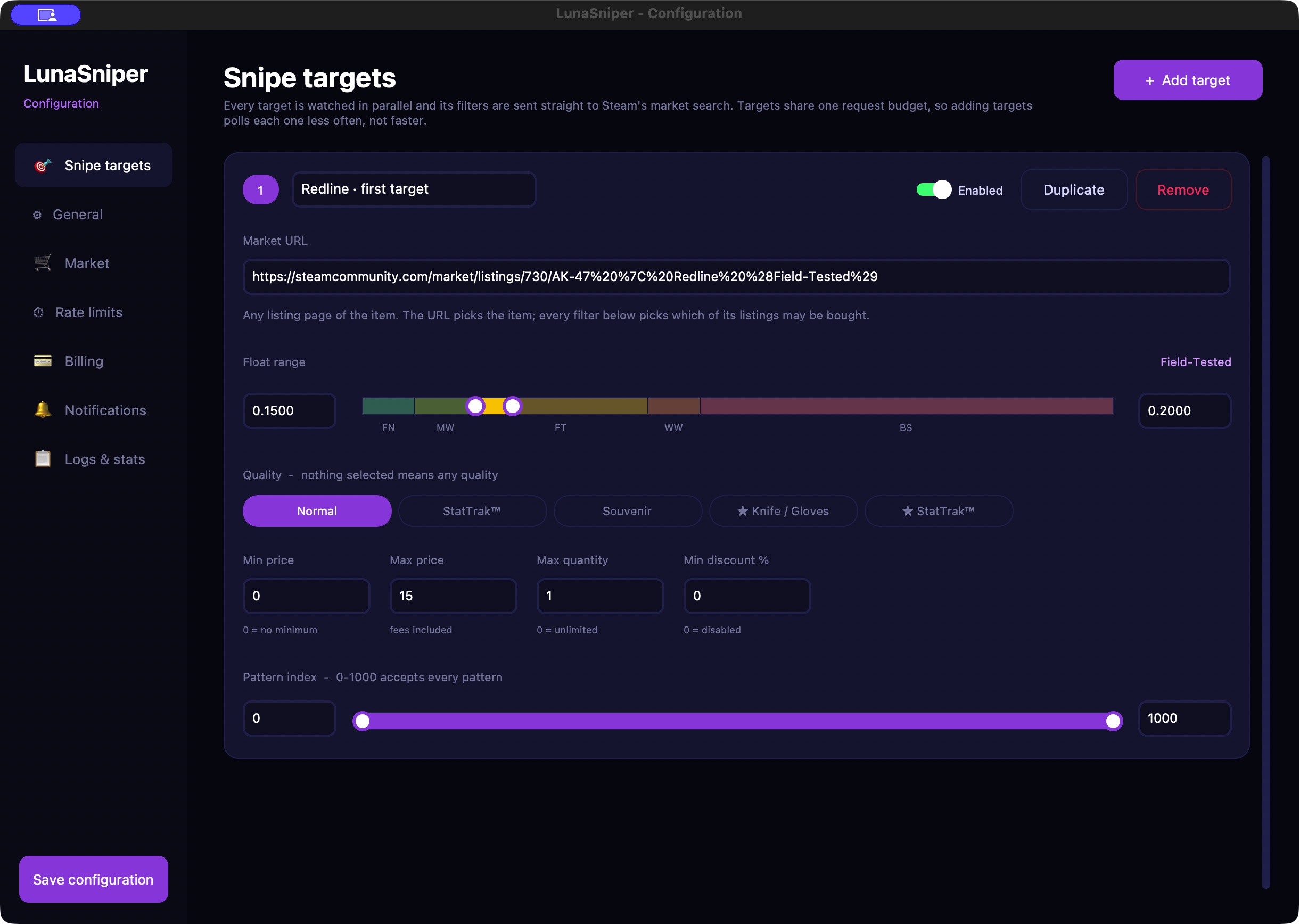
Open Config Editor → Snipe targets and select Add target. Enter an optional label, paste the item's Market URL, and configure its filters. Select Save configuration when finished.
Use a listing URL from the Steam Community Market, beginning with https://steamcommunity.com/market/listings/. A Steam inventory link, inspect link, or general search page is not a target URL.
The URL identifies the item. Set the float, quality, and other restrictions explicitly in the target rather than relying on words in the URL.
Price and quantity
Min price is the lowest price to accept; 0 removes the minimum. Max price is the highest price per item, including Steam fees, in the selected wallet currency. It must be greater than zero and at least as high as the minimum.
Enter amounts as currency units: 15.50 means fifteen units and fifty cents, not 1,550 units. Use a decimal point and do not include a currency symbol in the field.
Max quantity limits purchases for this target in the current run. 0 means unlimited. Each target has its own quantity, and a new run starts its count over. This is not a lifetime purchase limit or a shared budget across targets.
Check all enabled targets
Several targets can buy during the same session. A maximum price limits each item, not the total session spend. The separate verification purchase is outside these target limits.
Float range and quality
Float describes a skin's wear, from 0 to 1. Lower values generally indicate less wear. Set the lower and upper values using the fields or slider.
The colored bands show the familiar wear categories: Factory New, Minimal Wear, Field-Tested, Well-Worn, and Battle-Scarred. Use the numeric values when you need a precise range.
Under Quality, select the variants you want, such as Normal, StatTrak™, Souvenir, ★ Knife / Gloves, or ★ StatTrak™. Several selections allow several variants. Nothing selected means any quality, not “Normal only.”
For an item without a float, such as a case or sticker, leave the full 0–1 float range. A restrictive float filter excludes listings without float information.
Pattern index
Use Pattern index when you want a specific pattern or range:
- 0–1000 accepts any pattern.
- The same minimum and maximum, such as 661–661, selects one pattern index.
- A restricted range excludes listings without pattern information.
Leave the full range if you do not have a pattern requirement.
Minimum discount
Min discount % requires the price to be below a reference derived from market price history. 0 disables this filter. Values must be at least zero and less than 100.
For example, with a reference of 20.00 and a minimum discount of 10%, the price must be 18.00 or lower. Your Max price still applies: if it is 15.00, the listing must meet that lower ceiling too.
If no reliable reference is available, the discount filter blocks purchases for that listing. A history-based discount does not guarantee resale value or profit.
Example: one normal Redline
These are illustrative values, not current market prices:
- Label:
Redline · first target - Market URL: the Steam Market listing page for AK-47 | Redline.
- Float range:
0.15to0.20. - Quality:
Normal. - Min price:
0; Max price:15in your wallet currency. - Max quantity:
1. - Pattern index:
0to1000. - Min discount %:
0.
Run this in test mode first. If no matching listing exists at your price, Luna waits; it does not relax your filters.
Several targets
Use Duplicate to copy a target and change its label or filters. Use Enabled to temporarily exclude a target, or Remove to delete its card. Save after any change.
Avoid overlapping targets unless you intend them to buy independently. Completing one target does not stop the others. General → Max concurrent targets limits how many targets can run; adding targets can make each one update less frequently.
Stop and restart the sniper after saving target changes. Do not assume an already running session has picked them up.